BrianD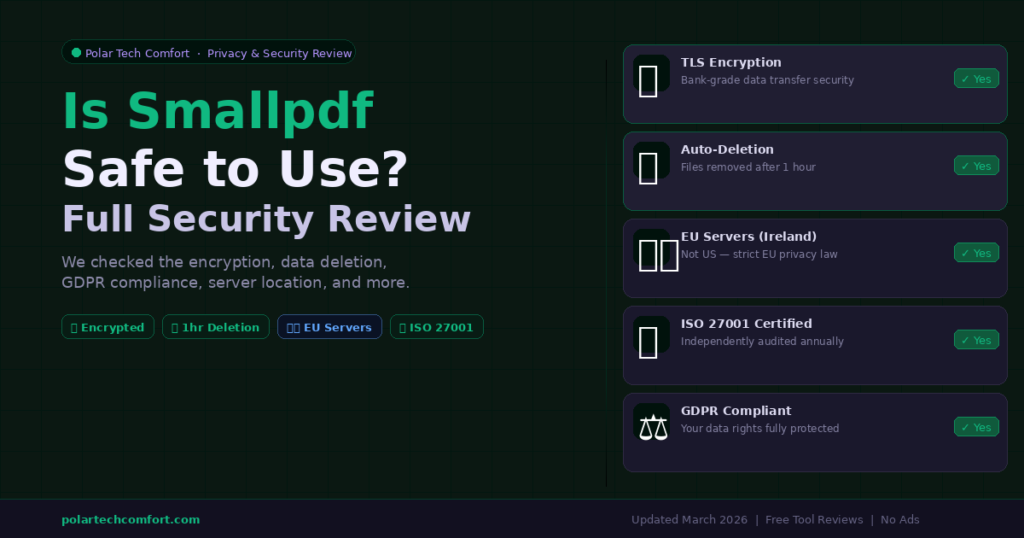
Yes — Smallpdf is safe for everyday PDF tasks. It uses TLS encryption, stores files on EU servers (Ireland), deletes uploads within one hour, and is ISO 27001 certified, GDPR compliant, and CCPA compliant. Avoid it for highly confidential documents. For complete privacy, use a browser-side tool that never uploads your files.
If you have ever used Smallpdf to compress a PDF, convert a document, or add an e-signature, you have probably wondered at some point is it actually safe to upload my files to this website?
It is a reasonable concern. You are sending documents to a third-party server, and depending on what is in those files, that matters. This article gives you a direct, factual answer based on Smallpdf’s published security documentation, certifications, and real-world use cases.
Smallpdf’s Security Measures — What It Actually Does
Smallpdf is a Swiss-based company, which means it operates under Switzerland’s data protection laws — among the strictest in the world. Here is a breakdown of the specific security measures in place:
When Is Smallpdf Safe — and When Should You Be Cautious?
The honest answer is that Smallpdf is safe for most everyday tasks, but the level of sensitivity of your document matters. Here is a clear breakdown:
| Document Type | Safe to Use? | Reason |
|---|---|---|
| CVs / Resumes | ✓ Yes | General personal info — low sensitivity |
| School / Uni Assignments | ✓ Yes | Non-confidential academic content |
| Business Reports (general) | ✓ Yes | No trade secrets or personal data |
| HR Forms / Company Docs | ⚠ Caution | Contains employee personal data — check company policy first |
| Legal Contracts | ⚠ Caution | May contain confidential or legally privileged content |
| Medical / Health Records | ✕ Avoid | Highly sensitive personal data — use offline tool |
| Financial / Bank Documents | ✕ Avoid | Account details, tax IDs — not worth the risk |
| Passport / National ID Scans | ✕ Avoid | Identity documents — never upload to any online tool |
⚠️ Important: Smallpdf is not a zero-knowledge platform — files are processed on their servers, meaning the data does briefly leave your device. If your document must never leave your device, use a browser-side tool with local processing.
Smallpdf vs Browser-Side Alternatives
The safest category of free tools are those that process files locally in your browser — your file never leaves your device. Here is how Smallpdf compares:
- Smallpdf — Server-side processing, EU servers, files deleted in 1 hour, ISO 27001 certified. Safe for general use.
- ILovePDF — Similar to Smallpdf. Server-side, files deleted in 2 hours. Good for everyday PDF tasks.
- Squoosh (Google) — Browser-side only. Image files never uploaded. Maximum privacy for image tasks.
- Polar Tech Comfort Tools — All tools process data locally in your browser. Zero uploads, zero storage, zero tracking.
Frequently Asked Questions
No — Smallpdf permanently deletes uploaded files from its servers within one hour of processing for free users. If you use cloud storage with a Smallpdf account, files are kept until you manually delete them, after which they are removed within one hour.
Under normal circumstances, no. Smallpdf states that files are only accessed by staff in limited cases such as responding to technical support requests. The platform’s ISO 27001 certification requires strict controls on who can access data internally.
Yes. Smallpdf is GDPR compliant and processes all files on EU servers in Ireland. As a Swiss-based company it also operates under Switzerland’s Federal Data Protection Act.
For image tasks, Squoosh (by Google) processes files entirely in your browser with zero uploads. For SEO and performance checks, all Polar Tech Comfort tools run locally with zero data leaving your device.
Both are excellent. Smallpdf has the edge on security credentials (ISO 27001, 1-hour deletion). ILovePDF is more generous on the free tier with no daily limits. Choose Smallpdf for sensitive documents, ILovePDF for maximum free functionality.
Verdict — Smallpdf Is Safe for Everyday Use
For the vast majority of everyday PDF tasks — compressing a CV, converting a report, merging documents — Smallpdf is a safe, reputable, and well-secured tool. Its ISO 27001 certification, EU server infrastructure, one-hour deletion policy, and GDPR compliance put it well above the average for free online tools.
The one caveat is simple: do not upload highly sensitive documents — medical records, passport scans, financial data — to any cloud-based tool, including Smallpdf. For those cases, use a browser-side tool that never uploads your files at all.